
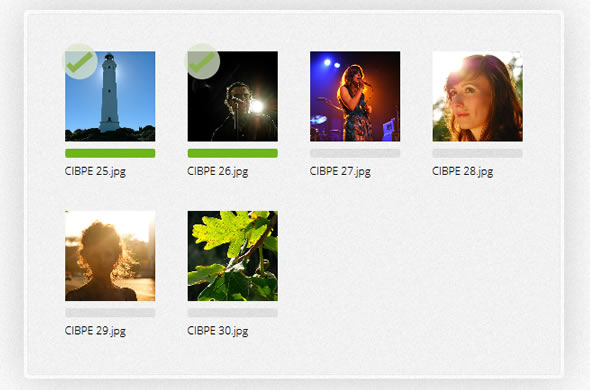
dropzone.js is an open source library that provides drag’n’drop file uploads by simply including a java-script file. It views previews of images and you can register to different events to control how and which files are uploaded.
Contents
usage
The typical way of using dropzone is by creating a form element with the class dropzone:
<form action="/file-upload" class="dropzone" id="my-dropzone"></form>
That’s it. Dropzone will find all form elements with the class dropzone,automatically attach itself to it, and upload files dropped into it to the specified action attribute.
Don’t forget to
requiredropzone, otherwise it won’t be activated.
To configure Dropzones created like this, you can write the configuration in theDropzone.options object, like this:
Dropzone.options.myDropzone = {
  maxFilesize: 2, // MB
  accept: (file, done) {
    if (file.name == "justinbieber.jpg") {
      done("Naha, you don't.");
    }
    else { done(); }
  }
};
The instantiated dropzone object is stored in the HTML element itself. You can access it like this:
$("form.dropzone").data("dropzone")
Dropzones don’t have to be forms. Any element with a .dropzone class will do, but you have to configure the url if you choose another element (in forms, the action attribute is used as url).
To programmatically create a dropzone on an element you can use the jQuery.dropzone() helper like this:
$("div#my-dropzone").dropzone({ url: "/file-upload", maxFilesize: 8 });
or without the jQuery helper:
new Dropzone($("div#my-dropzone"), { url: "/file-upload", maxFilesize: 8 });
The valid options are:
urlparallelUploadsHow many file uploads to process in parallelmaxFilesizein MBparamNameThe name of the file param that gets transferredcreateImageThumbnailsmaxThumbnailFilesizein MB. When the filename exeeds this limit, the thumbnail will not be generatedthumbnailWidththumbnailHeightacceptis a function that gets a file and adonefunction as parameter. If the done function is invoked without a parameter, the file will be processed. If you pass an error message it will be displayed and the file will not be uploaded.previewTemplateis a string that contains the template used for each dropped image. Change it to fulfill your needs but make sure to properly provide all elements.
layout
The HTML that is generated for each file by dropzone looks like this (although you can change it with the previewTemplate option):
<div class="preview file-preview">
 <div class="details"></div>
 <div class="progress"><span class="load"></span><span class="upload"></span></div>
 <div class="success-mark"><span>Success</span></div>
 <div class="error-mark"><span>Error</span></div>
 <div class="error-message"><span></span></div>
 <div class="filename"><span></span></div>
</div>
browser support
- Chrome 7+
- Firefox 4+
- IE 10+
- Opera 12+
- Safari 5+
For all the other browsers, dropzone provides an oldschool file input fallback.
Homepage: http://www.dropzonejs.com/
GutHub: https://github.com/enyo/dropzone
This is just the dropzone docs being passed off as your own work…
i was going through the tutorial but i cant understand how can i use dropzone without using the class in the form..
i basically want to have a div inside a form and call class=”dropzone in that div..but it dosent seems to work..
here is my code below:
var myDropzone = new Dropzone(“div#myId”, { url: “file-upload”})
please help me